
Choose the kind of PDF edit you need
“Edit a PDF” can mean several different things. A note, a form answer and a correction to the original wording use different controls. All available Folio tools and downloads are free; you can start the editor as a guest.
| Your task | Control | What it changes |
|---|---|---|
| Add a date, answer or note | Add Text | Places a new text box on the page. Existing wording stays in the PDF. |
| Correct original wording | Edit Text | Changes supported original text blocks. Scanned words need OCR elsewhere. |
| Add your signature | Sign | Places a drawn, typed or uploaded visual signature. It is not certificate-based signing. |
| Complete existing form fields | Fill the PDF’s supported fields | Enter answers in the interactive fields. For a flat scan, add text over the answer areas. |
How to edit a PDF on Android in your browser
Start with a saved PDF. If the document is inside an email or messaging app, download a copy first. Seeing a PDF in an attachment preview does not necessarily make it available to the browser’s file picker.
- Open Edit PDF in your browser and choose the PDF from the file picker. Check Recent, Downloads or the storage location where you saved it; labels vary by phone.
- Wait for the page preview, then choose Open in editor. Swipe the editor toolbar horizontally to find Add Text, Edit Text or Sign.
- For a new note, choose Add Text, tap an empty part of the page and type. For original wording, follow the Edit Text steps below.
- Open Properties and forms when you need appearance controls, then close it to see the page. Use Move and the bottom zoom controls for precise placement.
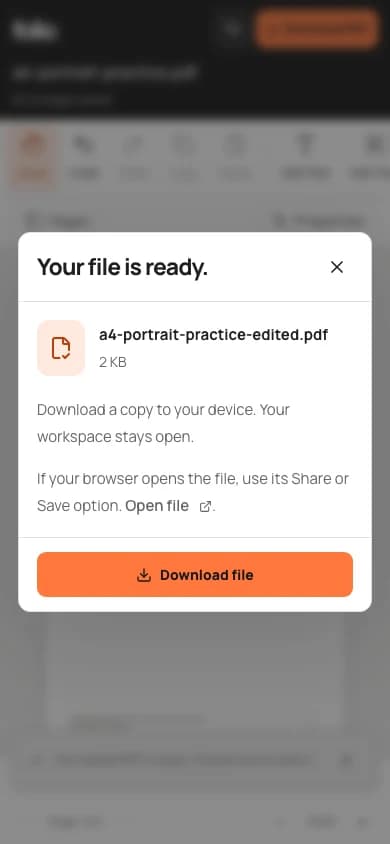
- Use Download PDF and wait for the browser to finish. In Chrome, find the file under More → Downloads or in your device’s Files app.
- Reopen the downloaded file, inspect the edited page and share that checked copy.
How to edit a PDF on iPhone in Safari
Keep the original in Files before editing. If Safari is displaying the source PDF, open its Share menu and choose Save to Files. Choose a folder you can recognize when the file picker opens.
- Open Edit PDF in Safari, choose a file and use the picker to locate the PDF you saved in Files.
- Wait for the page preview, then choose Open in editor. Swipe the toolbar to reveal the control you need; it may be outside the visible part of the toolbar.
- Add your note or signature, or use Edit Text for supported original text. Close the on-screen keyboard before checking the final placement.
- Use Download PDF. If the browser displays the finished PDF instead of saving it immediately, use Share → Save to Files and choose a name and folder.
- Open the saved PDF from Files and confirm that the changes are present before sending it.
How do I change the original PDF text on my phone?
Choose Edit Text when you need to correct words already in the document. Add Text creates a separate box; covering a word with that box does not remove the original content. Short replacements are easier to fit on a small screen.
- In the editor, choose Edit Text and wait for the supported text blocks to become selectable.
- Tap the text block and enter the replacement. Use Properties for appearance controls when needed.
- Keep the original font where possible and inspect the updated page. Longer wording does not automatically reflow the surrounding paragraph.
- Download the PDF, reopen it and check both the new wording and its spacing.
Try a practice PDF before editing your own document
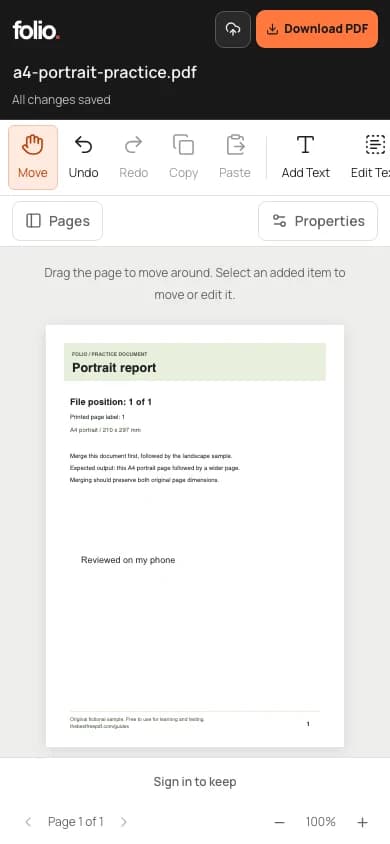
Download the fictional portrait practice PDF below and select it in Edit PDF. When the preview appears, choose Open in editor. Add “Reviewed on my phone” in a blank area, then download and reopen the result. Check that the new note is readable, the original heading is intact and the page edges are not clipped. This checks the full file-picker-to-download workflow without using a personal document.
Fix common phone editing and download problems
The browser’s file picker, the PDF editor and your phone’s downloads are separate places. Follow the symptom rather than repeatedly selecting the same file.
| Problem | What to try |
|---|---|
| The attachment is missing from the picker | Save it from the email or messaging app to Files or Downloads, then choose that saved copy. |
| I cannot see Add Text or Sign | Swipe the toolbar horizontally. Close Properties and forms when it covers the page. |
| The original words cannot be selected | The page may be a scan or use outlined lettering. Folio does not provide OCR; adding a note is still a separate option. |
| I saved, but cannot find a PDF on my phone | Save now stores the editable cloud workspace. Download PDF creates the file to keep or share. Check the browser’s download list. |
| The tab reloads or the file fails repeatedly | Keep the original and try a smaller document or a desktop browser. Image-heavy PDFs can exceed a phone’s available memory. |
Keep an original and understand guest saving
The editor uploads your PDF to private cloud storage for recovery. Guests have 100 MB of storage and files expire after 24 hours; wait for All changes saved before refreshing and download a finished copy before expiry. Sign in when you need to keep work in an account or access it on another device. A white box over sensitive text is not secure redaction, and editing an already digitally signed PDF can invalidate its signature. For long documents or precise layout work, a desktop gives you more room to check the result.
Practice: fill, download, and reopen one form on your phone
A small two-field form isolates mobile controls and finding the saved file. This replaces the repeated blog walkthrough with one maintained procedure and a downloadable comparison. The editor uploads this fictional PDF for private cloud saving, including for guests. Keep the download; guest workspaces expire after 24 hours.
- Save the workshop master where your phone’s file picker can find it, then open it in Folio. Open the Form panel.
- Enter Sam Example and check Receive workshop notes. Close the side panel to inspect both answers on the page.
- Download the PDF, use the download options shown by your browser, and open that saved file independently. Compare it with the completed interactive copy below.
| Check | Expected outcome |
|---|---|
| Finished output | The downloaded file shows the fictional name and checked box, and its two fields remain interactive. Finding a saved file is a different step from saving an editor workspace. |
| If your result differs | If a browser opens a preview, use its save/share controls to keep a copy. If typing is hidden by the keyboard or panel, dismiss it and check the page before exporting. Device and reader behavior can differ. |